Every owner I've worked with, whether they run a campus, a hospital or a semiconductor fab, has a version of this story. The project closes. The design team hands over a set of PDFs, a stack of O&M binders and perhaps a Revit model, and everyone signs off on the as-built package. Two years later the facilities team is back in CAD and spreadsheets, and the model sits in a folder nobody opens.
The model usually wasn't bad. It was a good design model. It answered the questions design and construction ask: does it fit, does it clash, what does it cost, what do we order. Operations asks different questions. What's in this room? What feeds this tool? What is this valve connected to? What changed since last year?
A design model can't answer those well, and the gap comes down to three things.
1. Nothing in the model has a stable identity
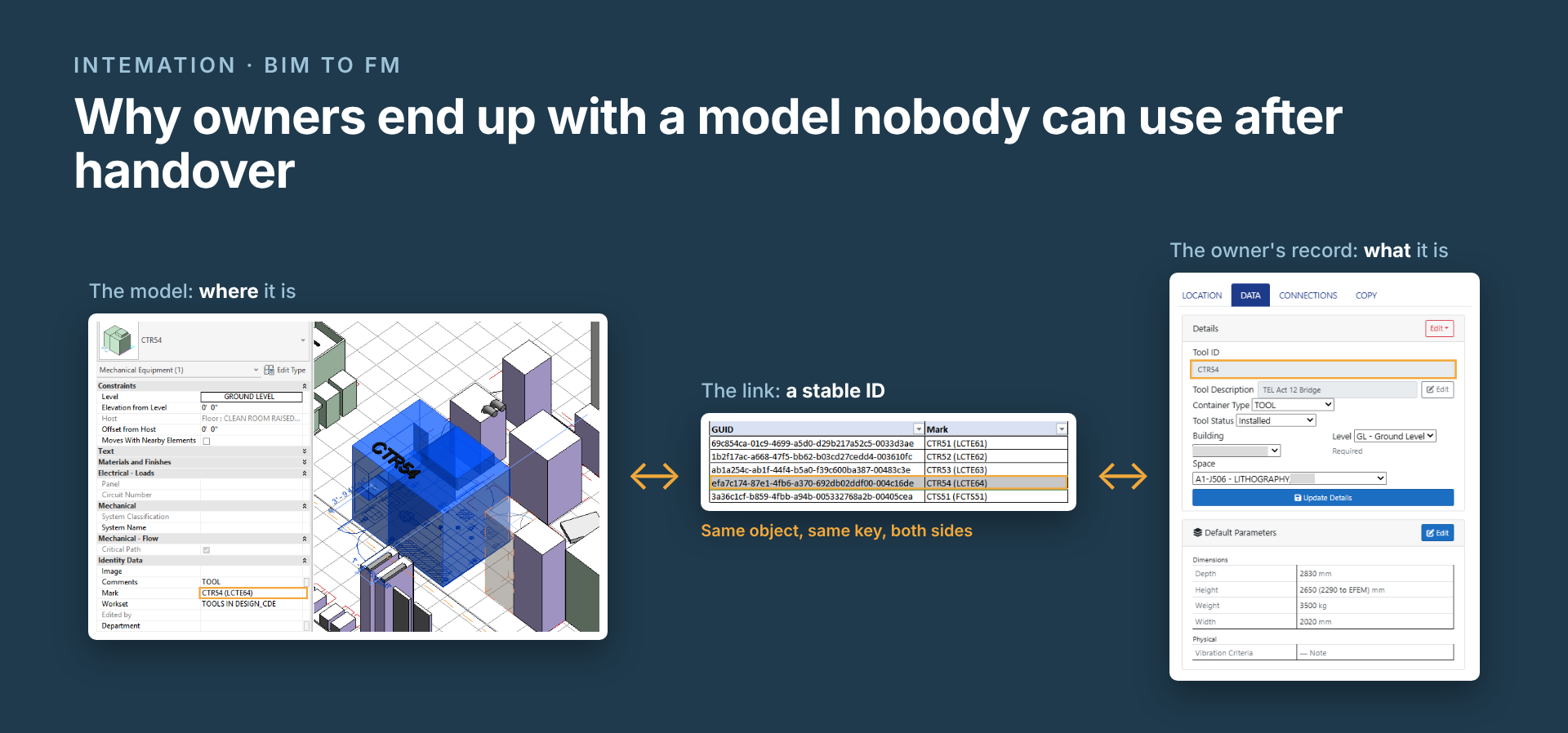
To run a building you have to point at a thing and keep pointing at it: this pump, this tool, this room. In most handover models the only handle is a name someone typed, or an internal ID the software can renumber.
Names drift. One person types "PU-1", another types "PU1", a third adds a trailing space nobody can see. Internal IDs can change on routine model edits. Either way, any record you link to the model breaks quietly, and nobody notices until a report comes back wrong or a model view simply "breaks".
2. The model doesn't hold the relationships operations needs
A design model knows geometry very well and relationships only loosely. Operations lives on relationships: this equipment belongs to that tool, this tool is served by that distribution, this asset is located in that room.
Those are different kinds of relationship, and they get mixed up. When "belongs to" and "is served by" are stored the same way, equipment counts double up and reports stop matching the floor. Often the room and space structure underneath is incomplete too, so there's nothing reliable to hang location on.
3. Nobody owns keeping it current
The model is frozen at handover, and the facility isn't. Renovations, equipment swaps and new tenants all leave the model a little further behind. In a fab it happens faster: tools move in, get hooked up and come out again all the time, so the model can go stale in months, not years. Running a facility and installing tools are the same problem at different speeds.
With no process and no owner, the model stops being trusted after the first few changes. After that, people quietly stop using it.
What actually helps
None of this needs a new file format. Over the years I've watched the formats change, from CAD to BIM to the cloud, and the problem(s) remain the same.
What helps is the owner deciding, in writing, what a usable handover looks like: an owner standard that every handover package is checked against. Without one, every designer and contractor delivers their own idea of "as-built," and the owner inherits a different model from every project. A good standard covers five things:
- Identity. Which tags every tracked object must carry, chosen so they survive normal model edits.
- Spaces. Building, level and room structure delivered complete and named consistently across disciplines, before equipment data is layered on.
- Relationships. How "belongs to", "is served by" and "is located in" are recorded, so they never get mixed up.
- Operational data. What lives in the model and what lives in the owner's records. The model shows where things are; service history, connections and status belong in a record linked to it (database).
- Updates. Who updates the model after handover, and how quickly. This is where most standards stop short. The same standard should apply to every renovation, equipment change and tool install afterward, so each one leaves the model current instead of a little further behind.
What's next
The next few posts take these one at a time, with the specific techniques that hold up in practice. I'll start with the most basic one: how to point at an object in a Revit model so the link still works next year.
This gap is also why I built the OwnerCDE, an owner-side platform that keeps operational records linked to the model by keys that survive edits. I'll use it as a worked example where it helps, but the techniques apply whatever system you use.
Planning a handover, or living with one that didn't work? Get in touch.